> For the complete documentation index, see [llms.txt](https://adminguidesgitbook.aerofiler.com.au/llms.txt). Markdown versions of documentation pages are available by appending `.md` to page URLs; this page is available as [Markdown](https://adminguidesgitbook.aerofiler.com.au/approvals/workflow-setup/default-values.md).
# Default Values
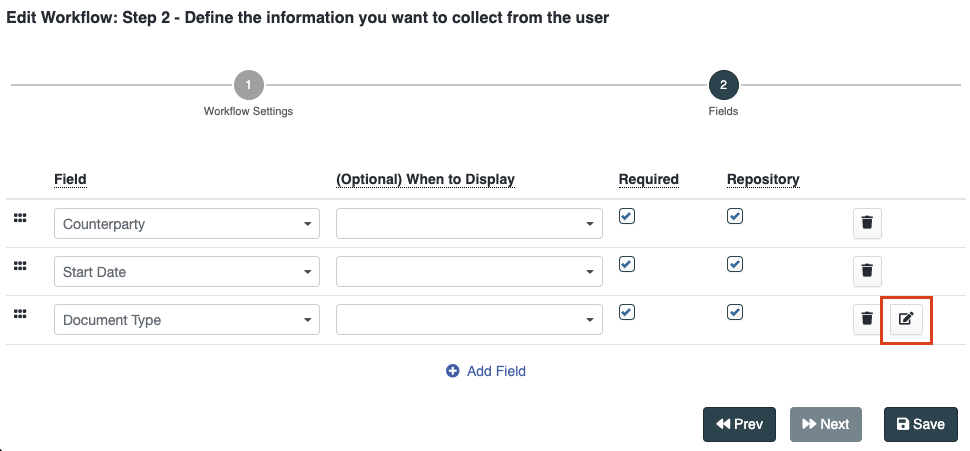
Suppose you are creating a workflow for Non-Disclosure Agreements and wish to capture the following fields: Counterparty, Start Date, and Document Type. Counterparty and Start Date will vary with each agreement, but Document Type should always be NDA. Rather than selecting "NDA" each type, you can create a default value.
{% hint style="info" %}
Currently, default values are supported for "List" and "Multi List" fields.
{% endhint %}
Firstly, click the "Edit" icon:
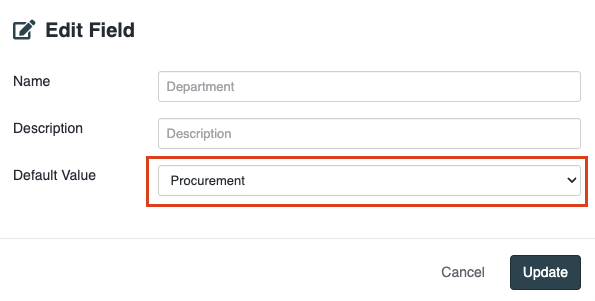
Then choose the relevant Default Value and click "Update":
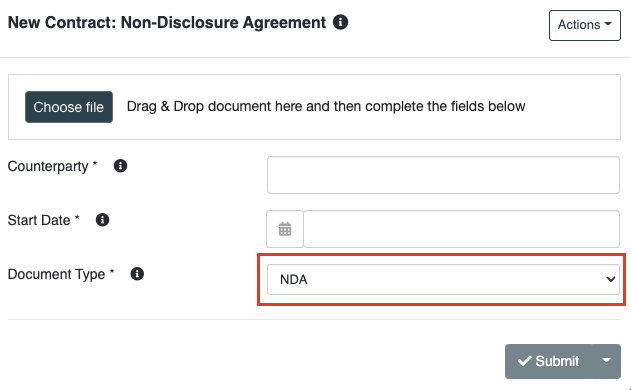
After saving the workflow, the next time that type of workflow is created, Document Type will automatically be populated with "NDA":